---
title: Set up or reset your password
description: Resetting Passwords on the Wildfire Solution (WFS) Platform
---
[Skip to content](https://help.ororatech.com/how-to-resetpassword#main-content)
- [English](https://help.ororatech.com/how-to-resetpassword)
- [Deutsch](https://help.ororatech.com/de/how-to-resetpassword)
- [Español](https://help.ororatech.com/es/how-to-resetpassword)
- [Français](https://help.ororatech.com/fr/how-to-resetpassword)
- [Português - Brasil](https://help.ororatech.com/pt-br/how-to-resetpassword)
- [Ελληνικά](https://help.ororatech.com/el/how-to-resetpassword)
English
Show submenu for translations
[](https://help.ororatech.com/?hsLang=en)
Open main navigation
Close main navigation
- - [English](https://help.ororatech.com/how-to-resetpassword)
- [Deutsch](https://help.ororatech.com/de/how-to-resetpassword)
- [Español](https://help.ororatech.com/es/how-to-resetpassword)
- [Français](https://help.ororatech.com/fr/how-to-resetpassword)
- [Português - Brasil](https://help.ororatech.com/pt-br/how-to-resetpassword)
- [Ελληνικά](https://help.ororatech.com/el/how-to-resetpassword)
English
Show submenu for translations
- Wildfire Solution App
Wildfire Solution App
How can we help you?
- There are no suggestions because the search field is empty.
1. [Help Center](https://help.ororatech.com/?hsLang=en)
2. [Detect, Monitor & Analyze Fires](https://help.ororatech.com/detect-monitor-analyze-fires?hsLang=en)
3. [Account & Settings](https://help.ororatech.com/detect-monitor-analyze-fires?hsLang=en#account-settings)
# Set up or reset your password
## Resetting Passwords on the Wildfire Solution (WFS) Platform
**Did you miss your welcome email?**
No worries! if you haven’t set up your account yet (or can't find the signup link), just follow the steps below to create a new password ⬇️
This will generate a fresh login link for you.
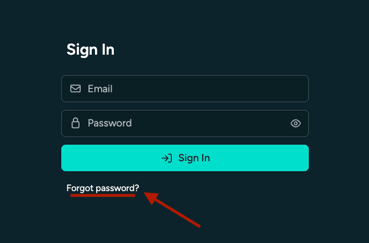
#### **Step 1: Click “Forgot Password” on the Login Page**
- Go to the WFS login page.
- Click the **“Forgot Password?”** link below the login fields.
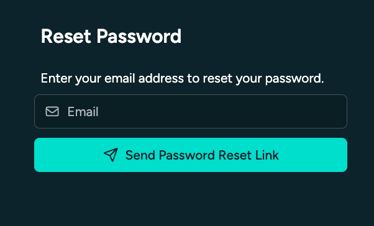
#### **Step 2 : Enter the email and submit the form**
- Enter the email address associated with your WFS account.
- Submit the form — you'll get an email with a link to set a new password.
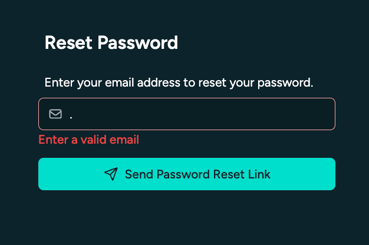
⚠️ **Seeing “Enter a valid email”?** Double-check your email and password for typos or extra spaces — that’s usually the issue.
#### ****
#### **Step 3: Check Your Email**
- Open the email and click the link inside.
- Set a new password to complete the process.
⚠️ Make sure to check your spam folder if you don’t see the email.
#### **Still stuck?**
Reach out to [support@ororatech.com](mailto:support@ororatech.com) and we’ll help you get logged in.
- [Start Here](https://help.ororatech.com/start-here?hsLang=en#main-content)
- [Explore WFS](https://help.ororatech.com/start-here?hsLang=en#explore-wfs)
- [Get Ready to Monitor](https://help.ororatech.com/start-here?hsLang=en#get-ready-to-monitor)
- [Learn the Basics](https://help.ororatech.com/learn-the-basics?hsLang=en#main-content)
- [Detections: Hotspots & Clusters](https://help.ororatech.com/learn-the-basics?hsLang=en#detections-hotspots-clusters)
- [Understand Fire Data](https://help.ororatech.com/learn-the-basics?hsLang=en#understand-fire-data)
- [Dive Deeper: Satellites & Fire Data](https://help.ororatech.com/learn-the-basics?hsLang=en#dive-deeper-satellites-fire-data)
- [Detect, Monitor & Analyze Fires](https://help.ororatech.com/detect-monitor-analyze-fires?hsLang=en#main-content)
- [Monitor & Assess Fire Activity](https://help.ororatech.com/detect-monitor-analyze-fires?hsLang=en#monitor-assess-fire-activity)
- [Fire Spread](https://help.ororatech.com/detect-monitor-analyze-fires?hsLang=en#fire-spread)
- [Burnt Areas & Data Analysis](https://help.ororatech.com/detect-monitor-analyze-fires?hsLang=en#burnt-areas-data-analysis)
- [Notifications](https://help.ororatech.com/detect-monitor-analyze-fires?hsLang=en#notifications)
- [Account & Settings](https://help.ororatech.com/detect-monitor-analyze-fires?hsLang=en#account-settings)
- [Additional Knowledge](https://help.ororatech.com/detect-monitor-analyze-fires?hsLang=en#additional-knowledge)
- [Integrations & Advanced Setup](https://help.ororatech.com/integrations-advanced-setup?hsLang=en)
- [Product Updates](https://help.ororatech.com/product-updates?hsLang=en)
- [Academy & Tutorials](https://help.ororatech.com/academy-tutorials?hsLang=en)
- [During an Active Fire](https://help.ororatech.com/during-an-active-fire?hsLang=en)
- [The Science Behind WFS](https://help.ororatech.com/the-science-behind-wfs?hsLang=en)
[](https://ororatech.com/)
[mailto:email@email.com](mailto:email@email.com)
Copyright © 2026, OroraTech