---
title: Introduction Monitored Areas and Sub-areas
description: Guideline for Do it yourself Customer AOIs (Monitored Area) Integration
---
[Skip to content](https://help.ororatech.com/monitored-areas#main-content)
- [English](https://help.ororatech.com/monitored-areas)
- [Bahasa Indonesia](https://help.ororatech.com/id/monitored-areas)
- [Deutsch](https://help.ororatech.com/de/monitored-areas)
- [Español](https://help.ororatech.com/es/monitored-areas)
- [Français](https://help.ororatech.com/fr/monitored-areas)
- [Português - Brasil](https://help.ororatech.com/pt-br/monitored-areas)
- [Ελληνικά](https://help.ororatech.com/el/monitored-areas)
- [Српски](https://help.ororatech.com/sr/monitored-areas)
English
Show submenu for translations
[](https://help.ororatech.com/?hsLang=en)
Open main navigation
Close main navigation
- - [English](https://help.ororatech.com/monitored-areas)
- [Bahasa Indonesia](https://help.ororatech.com/id/monitored-areas)
- [Deutsch](https://help.ororatech.com/de/monitored-areas)
- [Español](https://help.ororatech.com/es/monitored-areas)
- [Français](https://help.ororatech.com/fr/monitored-areas)
- [Português - Brasil](https://help.ororatech.com/pt-br/monitored-areas)
- [Ελληνικά](https://help.ororatech.com/el/monitored-areas)
- [Српски](https://help.ororatech.com/sr/monitored-areas)
English
Show submenu for translations
- Wildfire Solution App
Wildfire Solution App
How can we help you?
- There are no suggestions because the search field is empty.
1. [Help Center](https://help.ororatech.com/?hsLang=en)
2. [Start Here](https://help.ororatech.com/start-here?hsLang=en)
3. [Get Ready to Monitor](https://help.ororatech.com/start-here?hsLang=en#get-ready-to-monitor)
# Introduction Monitored Areas and Sub-areas
## Understand how Monitored Areas and Sub-Areas help you focus wildfire detection on what matters most.
In this article, you will learn:
- What are Monitored Areas?
- Why are Monitored Areas important?
- What are Sub-areas?
- How to set notifications
### What are Monitored Areas and Sub-Areas?
In OroraTech’s Wildfire Solution (WFS), you can define custom **Monitored Areas** for wildfire monitoring.
- A **Monitored Area** is your main zone for tracking fire activity. It determines where detections are filtered and alerts are sent. They are defined by a name, geographic extent and notification delivery methods.
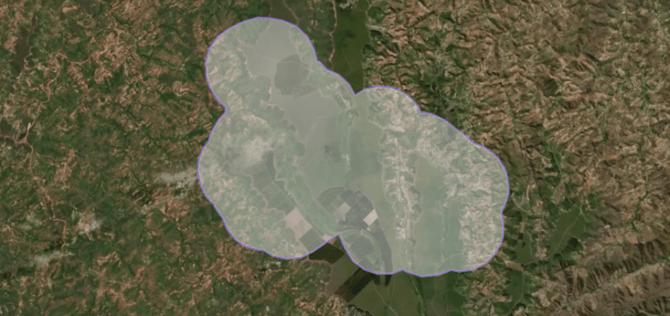
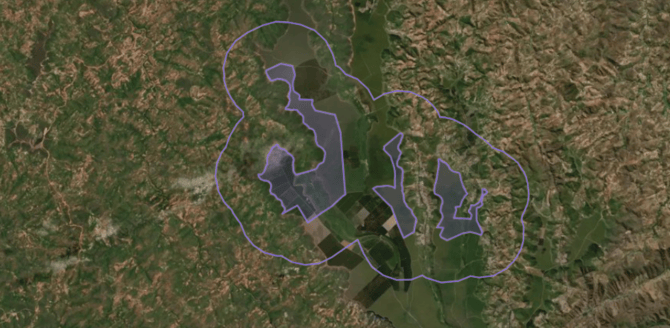
- A **Sub-Area** is a smaller property or asset (e.g., county, plantation, forest, conservation unit) **inside** a Monitored Area. It allows you to identify fires down to specific sites and shows up in notifications and the Incident Overview.
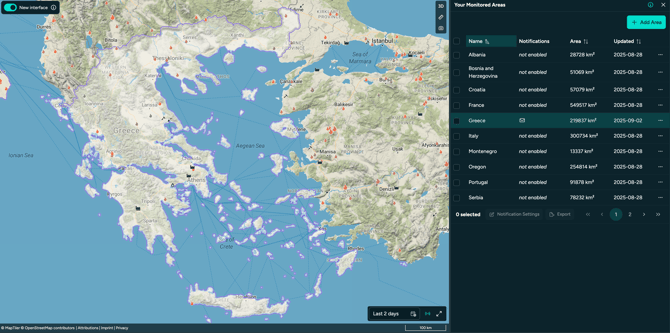
- An example of a Monitored Area with Sub Area properties: Here we have Greece as a Monitored Area, covering the whole country as one area.
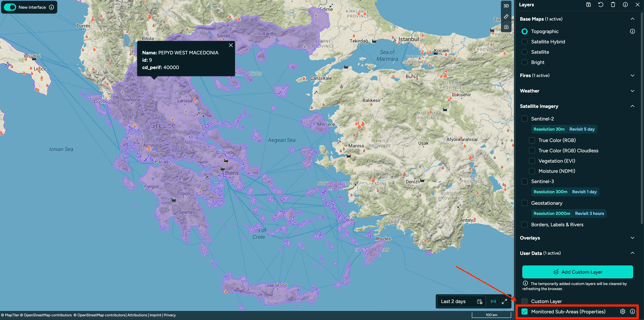
- But the area has Sub-Area properties showing the 13 territories of Greece.
📌 *Users belonging to the same Organization can view and share Monitored Areas.*
---
#### Why Monitored Areas matter?
- Easily verify which parts of your region of interest are actively monitored and will trigger notifications.
- Use the [Incident Overview](https://help.ororatech.com/incident-overview?hsLang=en) to track all Monitored Areas and quickly identify the most critical fire events affecting your assets.
- Receive tailored notifications for specific areas, with precise details on where and when fire activity is detected.
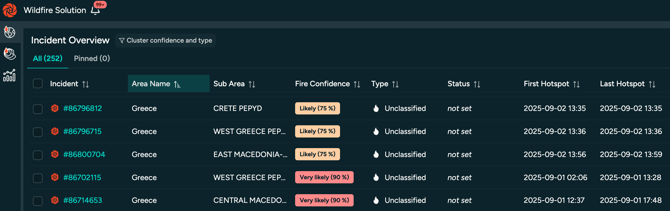
#### Example of Incident Overview:
Here the value of Sub Area properties is visible. Beside the Area Name "Greece" the specific region is shown right away, e.g. "CRETE PEPYD".
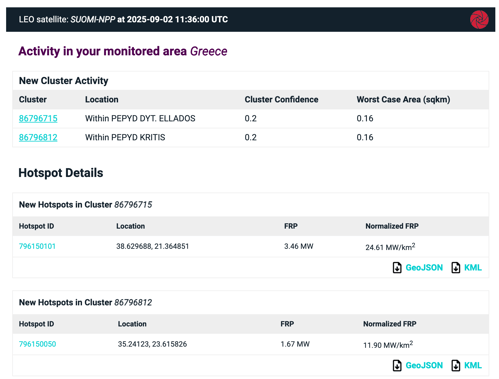
#### Example of Email Notification:
#### Again, the title states in which Monitored Area the activity was detected, and further the sub-area region is given under "Location".
---
### How to create or Upload Monitored Areas?
The article [Set Up Monitored Areas & Sub-Areas](https://help.ororatech.com/integrating-areas?hsLang=en) explains how to easily upload your Monitored Areas and their properties to WFS, including Sub-Areas, without external assistance.
If you need support with the creation of your Monitored area, visit [Let OroraTech Upload Your Monitoring Areas](https://help.ororatech.com/monitored-area-integration-support?hsLang=en) to learn how we can support you during the process.
Don't forget that you can contact [support@ororatech.com](mailto:support@ororatech.com) anytime. We are here to help!
- [Start Here](https://help.ororatech.com/start-here?hsLang=en#main-content)
- [Explore WFS](https://help.ororatech.com/start-here?hsLang=en#explore-wfs)
- [Get Ready to Monitor](https://help.ororatech.com/start-here?hsLang=en#get-ready-to-monitor)
- [Learn the Basics](https://help.ororatech.com/learn-the-basics?hsLang=en#main-content)
- [Detections: Hotspots & Clusters](https://help.ororatech.com/learn-the-basics?hsLang=en#detections-hotspots-clusters)
- [Understand Fire Data](https://help.ororatech.com/learn-the-basics?hsLang=en#understand-fire-data)
- [Dive Deeper: Satellites & Fire Data](https://help.ororatech.com/learn-the-basics?hsLang=en#dive-deeper-satellites-fire-data)
- [Detect, Monitor & Analyze Fires](https://help.ororatech.com/detect-monitor-analyze-fires?hsLang=en#main-content)
- [Monitor & Assess Fire Activity](https://help.ororatech.com/detect-monitor-analyze-fires?hsLang=en#monitor-assess-fire-activity)
- [Fire Spread](https://help.ororatech.com/detect-monitor-analyze-fires?hsLang=en#fire-spread)
- [Burnt Areas & Data Analysis](https://help.ororatech.com/detect-monitor-analyze-fires?hsLang=en#burnt-areas-data-analysis)
- [Notifications](https://help.ororatech.com/detect-monitor-analyze-fires?hsLang=en#notifications)
- [Account & Settings](https://help.ororatech.com/detect-monitor-analyze-fires?hsLang=en#account-settings)
- [Additional Knowledge](https://help.ororatech.com/detect-monitor-analyze-fires?hsLang=en#additional-knowledge)
- [Integrations & Advanced Setup](https://help.ororatech.com/integrations-advanced-setup?hsLang=en)
- [Product Updates](https://help.ororatech.com/product-updates?hsLang=en)
- [Academy & Tutorials](https://help.ororatech.com/academy-tutorials?hsLang=en)
- [During an Active Fire](https://help.ororatech.com/during-an-active-fire?hsLang=en)
- [The Science Behind WFS](https://help.ororatech.com/the-science-behind-wfs?hsLang=en)
[](https://ororatech.com/)
[mailto:email@email.com](mailto:email@email.com)
Copyright © 2026, OroraTech