---
title: Custom User Data Integrations
description: OroraTech can integrate can integrate various data files into the Wildfire Solution, either for your personal use or, upon request, for other members of your organization or even across different orga
---
[Skip to content](https://help.ororatech.com/setting-up-custom-data-integrations#main-content)
- [English](https://help.ororatech.com/setting-up-custom-data-integrations)
- [Deutsch](https://help.ororatech.com/de/setting-up-custom-data-integrations)
- [Español](https://help.ororatech.com/es/custom-data)
- [Français](https://help.ororatech.com/fr/setting-up-custom-data-integrations)
- [Português - Brasil](https://help.ororatech.com/pt-br/setting-up-custom-data-integrations)
- [Ελληνικά](https://help.ororatech.com/el/setting-up-custom-data-integrations)
English
Show submenu for translations
[](https://help.ororatech.com/?hsLang=en)
Open main navigation
Close main navigation
- - [English](https://help.ororatech.com/setting-up-custom-data-integrations)
- [Deutsch](https://help.ororatech.com/de/setting-up-custom-data-integrations)
- [Español](https://help.ororatech.com/es/custom-data)
- [Français](https://help.ororatech.com/fr/setting-up-custom-data-integrations)
- [Português - Brasil](https://help.ororatech.com/pt-br/setting-up-custom-data-integrations)
- [Ελληνικά](https://help.ororatech.com/el/setting-up-custom-data-integrations)
English
Show submenu for translations
- Wildfire Solution App
Wildfire Solution App
How can we help you?
- There are no suggestions because the search field is empty.
1. [Help Center](https://help.ororatech.com/?hsLang=en)
2. [Integrations & Advanced Setup](https://help.ororatech.com/integrations-advanced-setup?hsLang=en)
# Custom User Data Integrations
OroraTech can integrate can integrate various data files into the Wildfire Solution, either for your personal use or, upon request, for other members of your organization or even across different organizations. The types of data we can integrate include:
💡 You can upload **GeoJSON, KML, and KMZ** files directly to your organization. Select **Upload File to Organization** to add your GIS data and share it with your organization.
- **Shapefiles**: Use custom shapefiles to define your monitored areas.
- **Layers for AOIs**: Add specific layers relevant to your Areas of Interest (AOIs) for enhanced monitoring, such as plantations, power lines, roads, etc.
- **Fuel Maps:** To improve wildfire spread simulations based on your local fuel types and classes!
- **Wildfire perimeters:** To keep the overview use and share affected areas and compare them to our clusters from:
- **Official sources**
- **Drones, Aerial Resources**
- **Other Detection Systems**: Integrate data from additional service providers, such as cameras and sensors, to create a comprehensive monitoring setup. Please refer to [Integrated Incidents](https://help.ororatech.com/integrated-incidents?hsLang=en) as this feature expands considerable capabilities of the solution in terms of a holistic view of all incidents no matter from which detection source they come from.
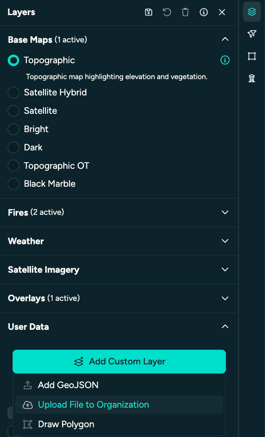
The integration capabilities enhance the flexibility of the Wildfire Solution, enabling each organization to have a tailored view that aligns with their specific monitoring and alerting needs.
Contact support@ororatech.com if you would like to integrate specific data sets into your profile(s).
\=
- [Start Here](https://help.ororatech.com/start-here?hsLang=en#main-content)
- [Explore WFS](https://help.ororatech.com/start-here?hsLang=en#explore-wfs)
- [Get Ready to Monitor](https://help.ororatech.com/start-here?hsLang=en#get-ready-to-monitor)
- [Learn the Basics](https://help.ororatech.com/learn-the-basics?hsLang=en#main-content)
- [Detections: Hotspots & Clusters](https://help.ororatech.com/learn-the-basics?hsLang=en#detections-hotspots-clusters)
- [Understand Fire Data](https://help.ororatech.com/learn-the-basics?hsLang=en#understand-fire-data)
- [Dive Deeper: Satellites & Fire Data](https://help.ororatech.com/learn-the-basics?hsLang=en#dive-deeper-satellites-fire-data)
- [Detect, Monitor & Analyze Fires](https://help.ororatech.com/detect-monitor-analyze-fires?hsLang=en#main-content)
- [Monitor & Assess Fire Activity](https://help.ororatech.com/detect-monitor-analyze-fires?hsLang=en#monitor-assess-fire-activity)
- [Fire Spread](https://help.ororatech.com/detect-monitor-analyze-fires?hsLang=en#fire-spread)
- [Burnt Areas & Data Analysis](https://help.ororatech.com/detect-monitor-analyze-fires?hsLang=en#burnt-areas-data-analysis)
- [Notifications](https://help.ororatech.com/detect-monitor-analyze-fires?hsLang=en#notifications)
- [Account & Settings](https://help.ororatech.com/detect-monitor-analyze-fires?hsLang=en#account-settings)
- [Additional Knowledge](https://help.ororatech.com/detect-monitor-analyze-fires?hsLang=en#additional-knowledge)
- [Integrations & Advanced Setup](https://help.ororatech.com/integrations-advanced-setup?hsLang=en)
- [Product Updates](https://help.ororatech.com/product-updates?hsLang=en)
- [Academy & Tutorials](https://help.ororatech.com/academy-tutorials?hsLang=en)
- [During an Active Fire](https://help.ororatech.com/during-an-active-fire?hsLang=en)
- [The Science Behind WFS](https://help.ororatech.com/the-science-behind-wfs?hsLang=en)
[](https://ororatech.com/)
[mailto:email@email.com](mailto:email@email.com)
Copyright © 2026, OroraTech