
In this article, we'll cover:
- How to adjust your preferred units of measurement, language, and timezone.
- Steps to save and update your settings in the Wildfire Solution.
Customize your Wildfire Solution experience by adjusting your profile settings. From changing units (hectares or kilometers) to selecting your preferred language (Portuguese, Spanish, and more) and timezone, you can personalize the interface to best suit your needs.
Steps to Manage Profile Settings
-
Access the Settings Menu
Navigate to Account → Settings to open the settings options.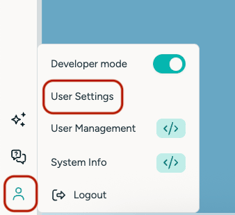
-
Adjust Your Preferences
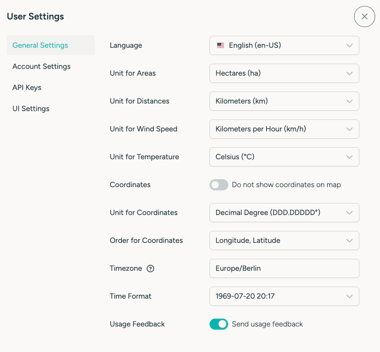
In the Settings submenu, you can update:-
Units of Measurement: Choose a Metric, Imperial, or Custom unit preset.
- Metric applies metric units automatically.
- Imperial applies imperial units automatically.
- Custom lets you configure individual measurement units.
- Language: Select from multiple languages, including Portuguese, Spanish, German and French.
- Timezone: Set your preferred timezone for accurate timestamping.
Ensure all settings reflect your preferences.
-
-
Save Your Changes
Once adjustments are made, click on Update to save all changes.
💡 With these simple steps, you can easily tailor your Wildfire Solution interface to fit your needs.
⚙️ Adjust settings anytime to keep your data display and experience exactly how you prefer.