
🔍 What is a Wildfire Snapshot?
Wildfire Snapshot is a new collaboration feature in WFS that lets you generate a secure, read-only link to any cluster (fire incident). It’s designed for quick information sharing with field crews, agencies, and external partners, especially during high-pressure operations.
✅ What makes it useful?
- Share exactly what you see in WFS: a specific cluster, with time filters, satellite data, and map zoom.
- No login required: Recipients don’t need a WFS account to access the snapshot.
- Read-only & secure: Snapshots are static, non-editable, and expire after 30 days by default.
- Interactive map: Partners can zoom and explore the fire area, but cannot make any changes.
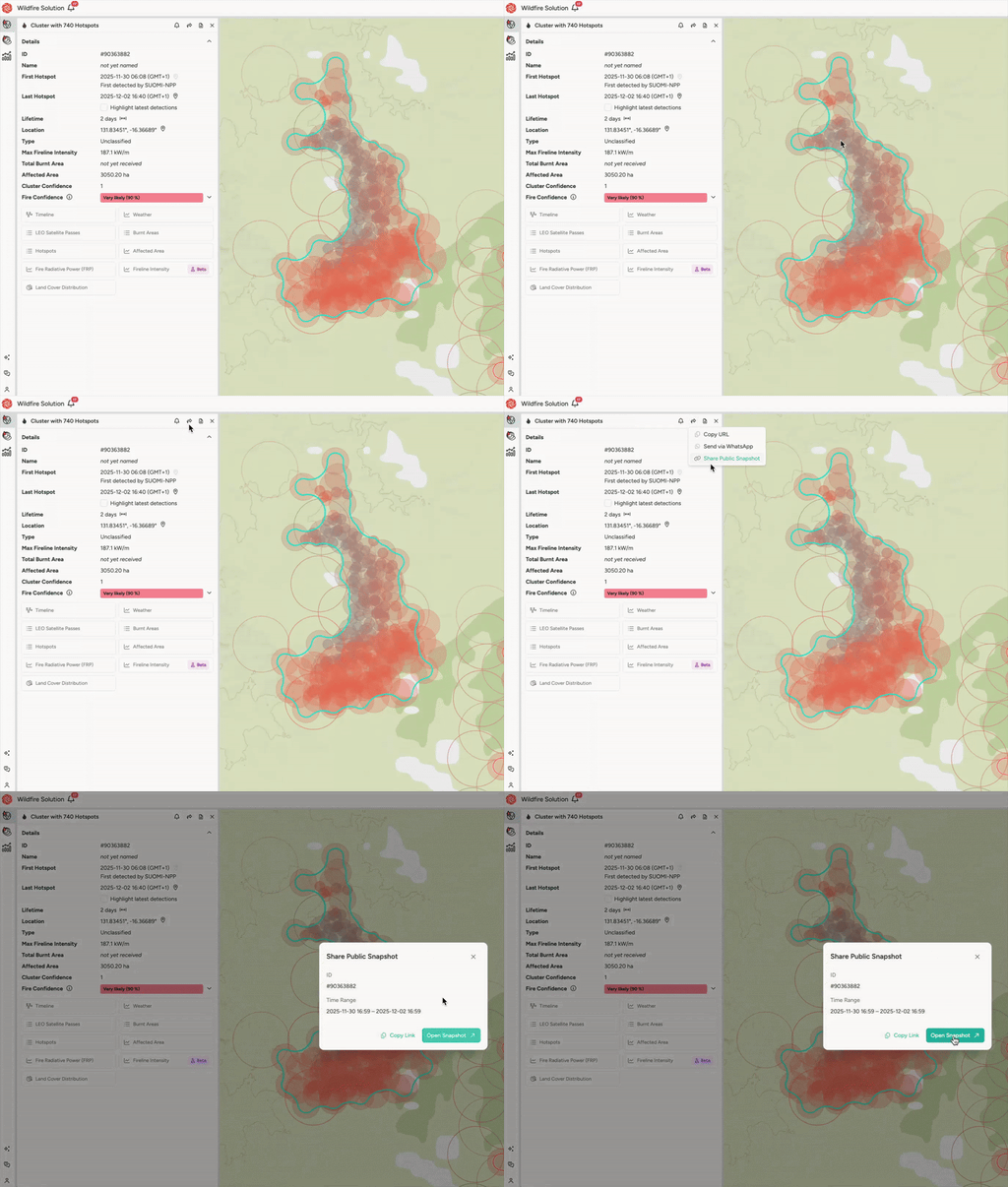
🛠️ How to share a Wildfire Snapshot
- Open the Cluster you want to share
- Click the Share button (top-right)
- Select Share Public Snapshot
- Choose your time range
- Copy the generated link or open Snapshot
🚫 No sign-in required | 🔒 Read-only | ⏳ Link expires after 30 days
💡 When to use it
- Sharing situational awareness with emergency services or contractors
- Supporting joint firefighting efforts
- Giving media or public agencies limited visibility
- Briefing internal teams without WFS access
🔗 Example Use Case
Your fire control center detects an incident near a sensitive area. Instead of sending screenshots or lengthy descriptions, you generate a Wildfire Snapshot and share it with:
- Local authorities
- Aerial contractors
- Emergency dispatch units
They all see the same incident view you’re working from instantly, with no confusion.
Keep in Mind
- Snapshots are not live-updating (they freeze the current state when generated)
- You can share multiple snapshots if the situation evolves
- Snapshots only include visible data from your current map view (filters, overlays, etc.)
Need help? Reach out via the chat or contact your CSM.
👉 Or check our Blog Post on Wildfire Snapshots